
One extension where you source. One base for the whole team.
A browser extension for Chrome and Edge, a shared candidate base, teammate alerts, templates in the chat and follow-up reminders in your calendar.
Works alongside your ATS or as your main base
What does OliApp do?
OliApp is a team sourcing workspace for tech recruiting teams. Its browser extension creates candidate cards from profiles on supported platforms, and the team works from one shared base with teammate alerts, follow-up reminders, roles and permissions.
OliApp at a glance
| Category | Team sourcing workspace for tech recruiting teams |
|---|---|
| Works in | Web app and a browser extension for Chrome and Edge |
| Supported platforms | LinkedIn, Djinni, Telegram, WhatsApp, Gmail, Slack, Behance |
| Calendars | Google Calendar, Outlook |
| Teammate alerts | The side panel shows who on the team already works with the person |
| AI | Parses CVs into card fields and searches your own base in plain language |
| ATS | Works alongside your ATS or as your main base |
| Plans | Personal: free for one recruiter. Pro: for teams |
The functions available on each platform depend on that platform's permissions.
OliApp is a recruiter productivity tool built around one idea: every candidate your team finds lands on one shared card, and everyone sees who is already in touch.
Save candidates from the profile you have open
- Open a candidate's profile on a supported platform.
- Create a candidate card from the open profile: name, profile link, public contacts and location fill in automatically.
- Confirm the position and save.
- Set a follow-up reminder in the same form.
The extension also highlights your keywords and negative keywords on profiles for each position, so the parts that matter stand out while you read. You can start free without an account: keyword highlighting and up to six message templates work right away.
More on the extension: Chrome extension for recruiters.
Supported platforms and what works on each
The extension works on LinkedIn, Djinni, Telegram, WhatsApp, Gmail, Slack and Behance. The functions available on each platform depend on that platform's permissions.
A candidate management system your whole team shares
Every candidate lives on one card that the team shares, and each recruiter also keeps a private Personal list. Each card shows who added the candidate. Candidates move through custom statuses in a table or on a kanban board, and filters by date, position, status, skills, location, experience and languages find them again. You can also upload CV files or import an existing base.
Job Ads add inbound candidates: share a public job link with your questions, and every application creates a card with the status «applied».
More on the shared base: Recruiting CRM for sourcing teams.
Teammate alerts before you write
When you open a profile, the extension's side panel shows whether the person is already in the base and who on the team works with them: green for an active conversation, orange when the candidate is assigned to another teammate, blue when a teammate contacted them earlier. Alerts cover everyone saved in OliApp from the day your team starts using it.
Hiring manager tools inside the candidate card
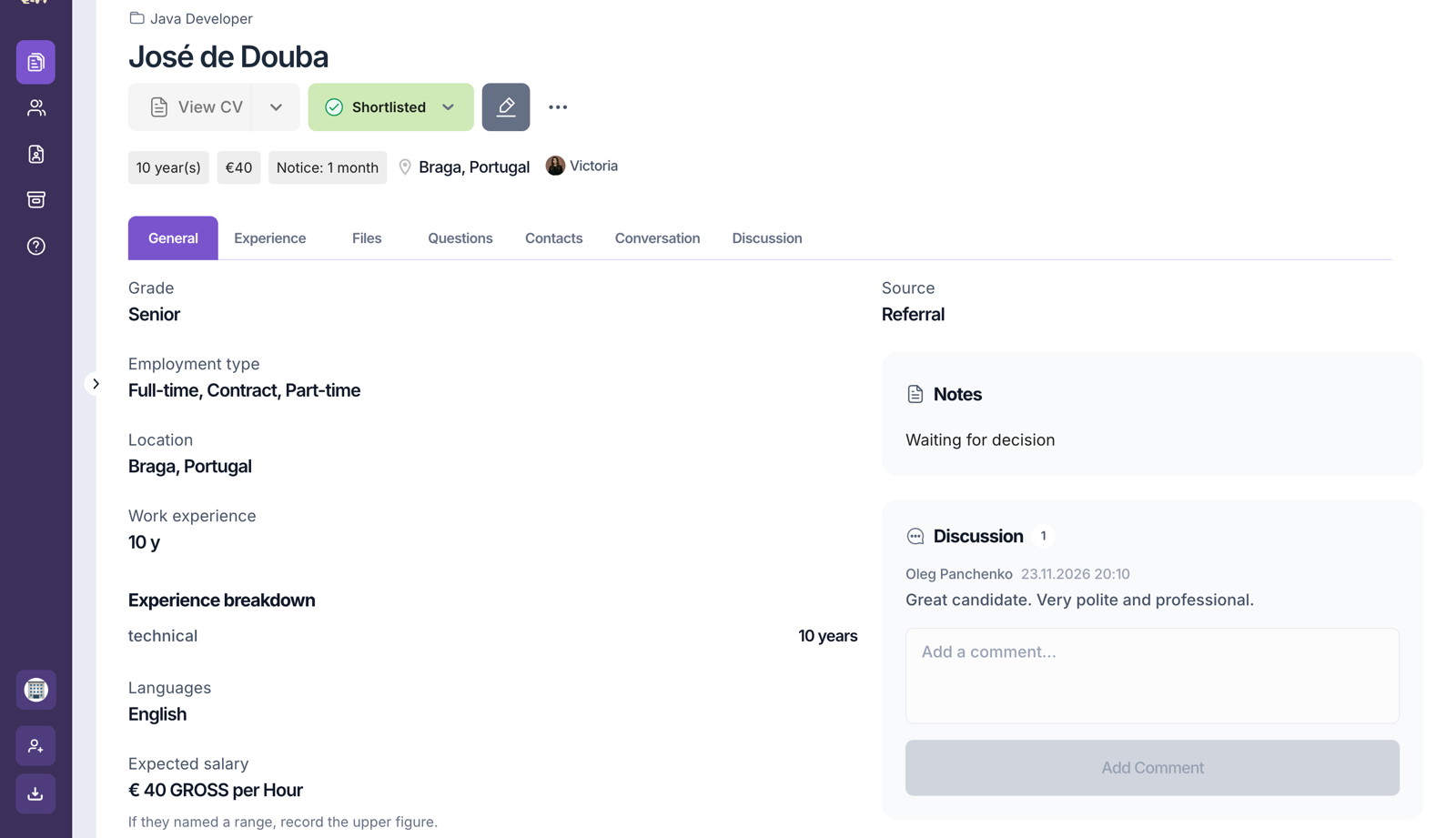
The card keeps the whole story in three tabs. Conversation shows the synced messages with the candidate. Discussion holds comments from recruiters and hiring managers after screening calls and technical interviews. History records every change and who made it.
Templates in the chat
Pick a template in the side panel and OliApp places it in the message field, with variables such as the first name filled from the open profile. You review the message and send it yourself. Templates can be shared with teammates, so the whole team writes in one voice.
Follow-ups in your calendar
When you add a candidate, set a follow-up reminder and add it to Google Calendar or Outlook. The reminder sits next to your other meetings, where you already look every day.
Text recruiting software for messengers and email
Many tech candidates reply faster in Telegram, WhatsApp or Slack than by email. OliApp creates the card from the chat you have open and syncs the conversation to the card, so the team sees the latest exchange in one place.
Roles, permissions and export
Space roles are Owner, Admin and Member; position roles are Admin, Supervisor and Member, plus custom roles. Roles decide who can view, edit or move candidates that teammates added, and which fields each role sees. Export works by the permission set for each role, and exported profiles carry their notes and comments.
Agencies can invite clients: your client sees the live board, how many candidates are in process and at which stage, with access limited to the roles you choose. Each client user takes a seat on your Pro plan.
More for agencies: Recruitment agency software.
AI parses the CV, recruiters decide
AI parses a CV into card fields and powers search across your own base in plain language, for example «Python developer in Lisbon». Both use AI credits. Recruiters make every decision in OliApp; the people on your team judge who fits the role.
Where OliApp fits in your stack
| Work | Where it lives |
|---|---|
| Sourcing, first contact, follow-ups, team ownership of candidates | OliApp |
| Interviews, offers and hiring workflow | Your ATS, connected to OliApp on request on Pro |
| Client contracts, placements and invoicing | Your agency finance tools |
On the Pro plan, the OliApp team builds an integration with your ATS on request, in 1 to 2 weeks. Teams without an ATS use OliApp as their main base.
Plans
Solo recruiters start on Personal, a free plan for one recruiter. Teams work on Pro, which adds the shared base, roles and permissions, and ATS integrations on request.
FAQ
What features does OliApp have?
OliApp gives tech recruiting teams a browser extension for Chrome and Edge, one shared candidate base, teammate alerts, message templates, follow-up reminders in Google Calendar or Outlook, roles and permissions, Job Ads, CV parsing and AI search across the team's own base.
Which platforms does the OliApp extension support?
The extension works on LinkedIn, Djinni, Telegram, WhatsApp, Gmail, Slack and Behance. The functions available on each platform depend on that platform's permissions.
How does OliApp keep two recruiters from messaging the same candidate?
When you open a profile, the extension's side panel shows whether the person is already in the base and who on the team works with them: green for an active conversation, orange when the candidate is assigned to another teammate, blue when a teammate contacted them earlier.
Does OliApp work with our ATS?
OliApp works alongside your ATS or as your main base. On the Pro plan, the OliApp team builds an integration with your ATS on request, in 1 to 2 weeks.
What does AI do in OliApp?
Recruiters make every decision in OliApp. AI parses CVs into card fields and powers search across your own base; the people on your team judge who fits the role.
Is OliApp free for a solo recruiter?
Solo recruiters start on Personal, a free plan for one recruiter. Teams work on Pro, which adds the shared base, roles and permissions, and ATS integrations on request.

See OliApp on your team's real search
One extension where you source, one base the whole team shares.