

Recruitment agency softwarefor the candidate side of the business
For agencies of 3 to 20 recruiters: one agency-owned base, teammate alerts before outreach, a live board for each client.

What does recruitment agency software do on the candidate side?
Recruitment agency software for the candidate side keeps every candidate, conversation and next step in one base the agency owns. OliApp adds teammate alerts before outreach and a live board your client can see.
One search, from first message to client view
- 1Recruiter finds a candidate
- 2Saved in one click to the agency baseHistory · Notes · Synced conversation
- 3Teammate alert if a colleague is in touch
- 4Candidate moves on the role's boardStatuses · Calendar follow-up
- 5Client sees the board for their roleStages · Candidates in process
What changes for the agency
One message per candidate
Teammate alerts show who is in touch before anyone writes.
A base the agency owns
Roles, hidden fields and export by permission keep candidates in the agency.
Your client sees progress
A live kanban board per role, with the fields you choose.
Every search on one board
Statuses per role, follow-ups as Google Calendar or Outlook events.

A CRM for recruiting agencies, built for the candidate side
Recruitment agency software covers two kinds of work. A full agency suite runs the business side: client accounts, placements, invoicing and job board posting. Candidate-side software runs the search itself: who your recruiters found, who they contacted, what each candidate said and what happens next.
OliApp is a CRM for recruiting agencies on the candidate side, built for agencies of 3 to 20 recruiters that source candidates themselves. Agencies comparing recruiting agency software or a recruitment agency CRM usually want three things from it: one message per candidate, a base that stays with the agency, and a simple way to show each client the search is moving. The sections below cover all three. For the category itself, see what a recruiting CRM does for sourcing teams.
Three things that cost an agency its reputation
Agency owners name the same three risks, and each one reaches candidates or clients.
Two recruiters message the same candidate.
Two people from one agency write to the same engineer about two roles. The candidate notices, and often the client does too. Teams describe it as recruiters who step on each other's toes.
Context lives in personal chats.
Notes, replies and promised follow-ups sit in each recruiter's inbox and messengers. When someone is away, the next recruiter starts from zero.
The base leaves with the recruiter.
Candidates kept in personal accounts and spreadsheets go wherever the recruiter goes next. Spreadsheets are still common: 35% of recruiters and hiring managers list them among their recruiting tools (Employ, 2025).

Every candidate hears from your agency once
When a recruiter opens a candidate's profile on a supported platform, the OliApp side panel shows whether the candidate is already in your base and who added them. A colour indicator marks the state: green for active communication, orange when the candidate is assigned to another teammate, blue when a teammate has contacted them before. The recruiter sees this before writing and can agree the next step with the colleague, so the candidate gets one message from your agency. Teammate alerts help prevent overlap before it reaches the candidate.
The alert covers contacts saved through OliApp on supported platforms, from the moment your team starts using it.

One base the agency owns
Every candidate your recruiters save goes into the agency's shared base: contacts, attached files, the synced conversation, team comments in the Discussion tab, and a History tab with every change and its author. The base belongs to the agency, so it stays when a recruiter moves on.
Each open role has an owner, and every teammate on it gets a role: Admin, Supervisor, Member or a custom role you create. For each role you decide:
- which candidate fields are visible, for example names, contacts or expected salary;
- whether a person sees all candidates on the role or the ones they added themselves;
- who can edit, change the status of or delete candidates added by teammates;
- who can export candidate data.
Exported profiles carry their notes and comments, so a handover keeps its context. Agencies that run candidate ownership rules set them through the same permissions: each candidate card shows who added the candidate, and roles decide who else can act on that candidate.

Show your client the search is moving
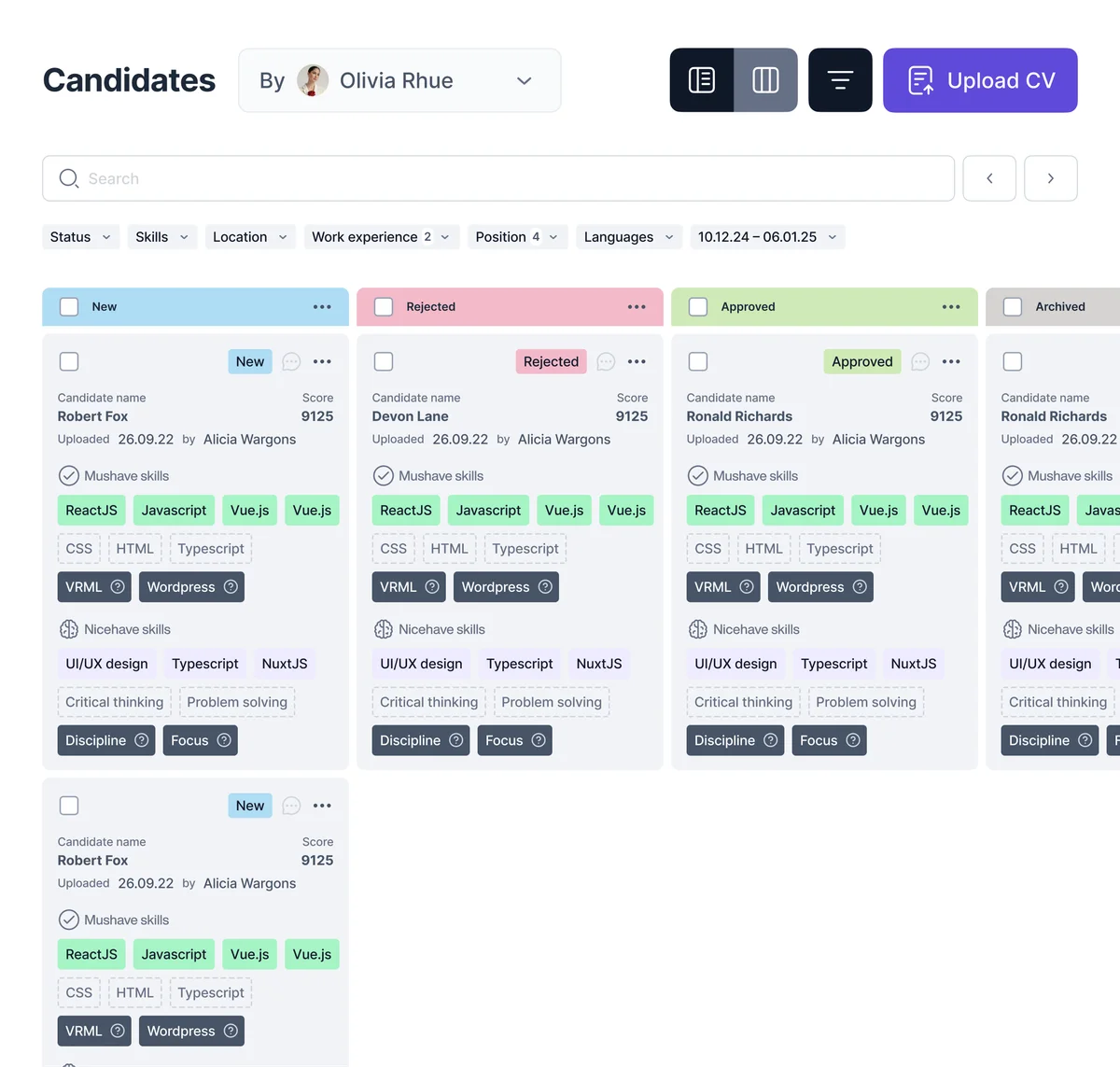
Between updates, a client wants to know one thing: is the search moving? In OliApp you give the client access to the board for their role. Your client sees the live board: how many candidates are in process and at which stage, with access limited to the roles you choose.
To set it up, create a custom role such as Client on the open role and choose what it sees, for example work experience and stages, while contacts and expected salary stay hidden. Then add your client as a member with that role. Each client user takes one seat on your plan. The board changes as your recruiters move candidates through statuses, so the client follows the same stages your team works with.

One board and one set of statuses for every client search
Each client search is an open role in OliApp with its own team, statuses and board. Agencies can also keep a separate Space for each client, with its own roles and candidates. Candidates sit on a table or a kanban board, recruiters move them through statuses, and follow-ups go to Google Calendar or Outlook as reminders tied to the candidate. Message templates with variables keep first messages consistent across the team.
For inbound candidates, a public Job Ads link with your questions creates a candidate card with the status «applied».

Find candidates from past searches
A new client role often matches people your agency has already spoken to. Search your own base in plain language, for example “Python engineer in Poland with fintech experience”, and narrow the results with filters by date, position, status, skills, location, experience and languages. AI search returns candidates from your base; your recruiters decide who to contact.


Works with your stack
OliApp opens next to the tools your recruiters already use. The OliApp browser extension for Chrome and Edge saves a profile in one click from supported platforms: Djinni, Telegram, WhatsApp, Gmail, Slack and Behance. The functions available on each platform depend on that platform's permissions.
Agencies run OliApp in two ways:
- Alongside an ATS. Sourcing, early conversations and team context live in OliApp; the ATS keeps applications, interviews and offers.
- As the main base. The agency runs every client search, status and follow-up in OliApp.
On the Pro plan, the OliApp team builds an integration with your agency's ATS on request within one to two weeks, for example Greenhouse, Lever, Ashby, Workable, Teamtailor, SmartRecruiters, Recruitee, JazzHR, BambooHR, Manatal, Bullhorn, Recruit CRM, Loxo or Zoho Recruit. Moving from spreadsheets or another tool, you can import your candidate base from a CSV or Excel file and choose how duplicates are merged. The test for any new tool in an agency is the one recruiters use in reviews: it fits perfectly into our daily recruitment workflow.
Save candidates from
- Djinni
- Telegram
- Gmail
- Slack
- Behance
Follow-ups land in
- Google Calendar
- Outlook
Runs in
- Chrome
- Edge
- CSV · Excel import

Who OliApp fits
Recruitment agencies of 3 to 20 recruiters
One base the agency owns, teammate alerts, a live board for each client, on the Pro plan
You are hereIndependent recruiters and solo headhunters
The free Personal plan with the browser extension
Chrome extension for recruitersSmall in-house teams without an ATS
Every candidate for open roles in one place
For small hiring teams
Teams searching for tech recruitment agency software or boutique recruitment agency tools are usually the agencies OliApp is built for: a few recruiters who source engineers and other specialists themselves and work closely with each client.
A full agency suite fits agencies that want placements, invoicing, a client CRM, back office and job board multiposting in one system. These agencies can run the candidate side in OliApp next to it.
Sources
- Employ (Zogby), 2025 Recruiter Nation Report: online survey of more than 1,200 US recruiters and hiring managers, September 2025; 35% listed spreadsheets among their recruiting tools. Checked October 29, 2026.
Questions agencies ask
See your agency's last search in OliApp

A team demo built around a search you ran recently.